

FieldFinders: Can AI Improve Your Metal Detecting?
Like most experienced detectorists, I reckon I've got a reasonable eye for promising ground. Give me an old map, some LiDAR and a bit of local history and I'll happily spend hours working out where I think good search areas might be. But can AI improve your metal detecting? Can it really spot something you've missed? Can AI tell you where you should hunt and improve your chances of success?
FieldFinders app FieldFinders app FieldFinders app
That's what I wanted to find out with FieldFinders, an app that brings together historical mapping, LiDAR, archaeological records and AI-powered landscape analysis. I've been impressed with what it can do on desktop at home, but I wanted to see whether any of that translated into actual finds in the field.
I had just the field in mind.
Four years of detecting, and not much to show for it
I've been detecting this particular field occasionally for about four years. There's plenty of history in the surrounding landscape, medieval field systems, Roman activity, civil war, and WW2. There are fields I gravitate back to time and time again on this permission, but this particular field has never been especially productive. Best way to describe it is....bland.
I'd studied the old maps, examined the LiDAR and developed my own ideas about where to concentrate my efforts. There's prominent medieval field enclosures, the old worked stone still visible through the pasture. Tall oaks stand majestically in avenues. Old tracks criss-cross the field. On paper its one hell of a prospect for a detectorist, yet, after four years, I'd largely lost interest in it. It had not lived up to expectations.
Which made it a rather good test for FieldFinders.
FieldFinders: The complete metal detecting suite
Before setting off, I opened FieldFinders on my desktop and started looking at the landscape. The app has a vast collection of research tools, including historical Ordnance Survey maps, archaeological records, historical information, PAS recorded finds and many different ways of viewing LiDAR data.
Anyone who has made do with the free LiDAR viewers online will be all too familiar with the washed-out interpretations available. Even those of us who download environment agency datasets into Qgis for our own processing will be impressed with how FieldFinders presents LiDAR layers. I was taken aback with the options available to me, both on desktop and in the app.

I particularly like the 3D Hybrid LiDAR, which lets you move around the landscape, alter the viewing angle and adjust the lighting, add different map layers to enrich your understanding of your target location. You can really get a feel for the location before setting foot on the land.
FieldFinders desktop
Letting AI scan the field
In Atlas mode you view the search area as a map, 2D or 3D, your call. Hit the Scan button and FieldFinders works its magic. The AI analysed the area and highlighted three locations it considered worth investigating. It provided descriptions of the features it thought it had identified, including a possible linear ditch or hollow-way and a rectangular enclosure or platform. Each came with a confidence rating and an explanation of what the AI was seeing. Note: run this at home or in the field
FieldFinders app FieldFinders app FieldFinders app
One of the areas was rated particularly highly. Unfortunately, an electric fence barred my access, the Deus 2 was really not impressed, so I diverted to investigate another recommendation first.
I was still sceptical.
But, for this field test I would follow its recommendations and keep an open mind.
A rather unexpected first find
I reached the first recommended area, a gentle slope beneath the bows of large swaying ash trees. I started searching. Almost immediately I picked up a gnarly signal, broken and unconvincing, iron and a messy non-ferrous tone combined. The XY display was favouring non-ferrous but that iron tone was definitely there. Typically these are canslaw, I thought.
I might well have ignored it. But to test the app I wanted to remove any bias I was bringing to the exercise. So I dug.
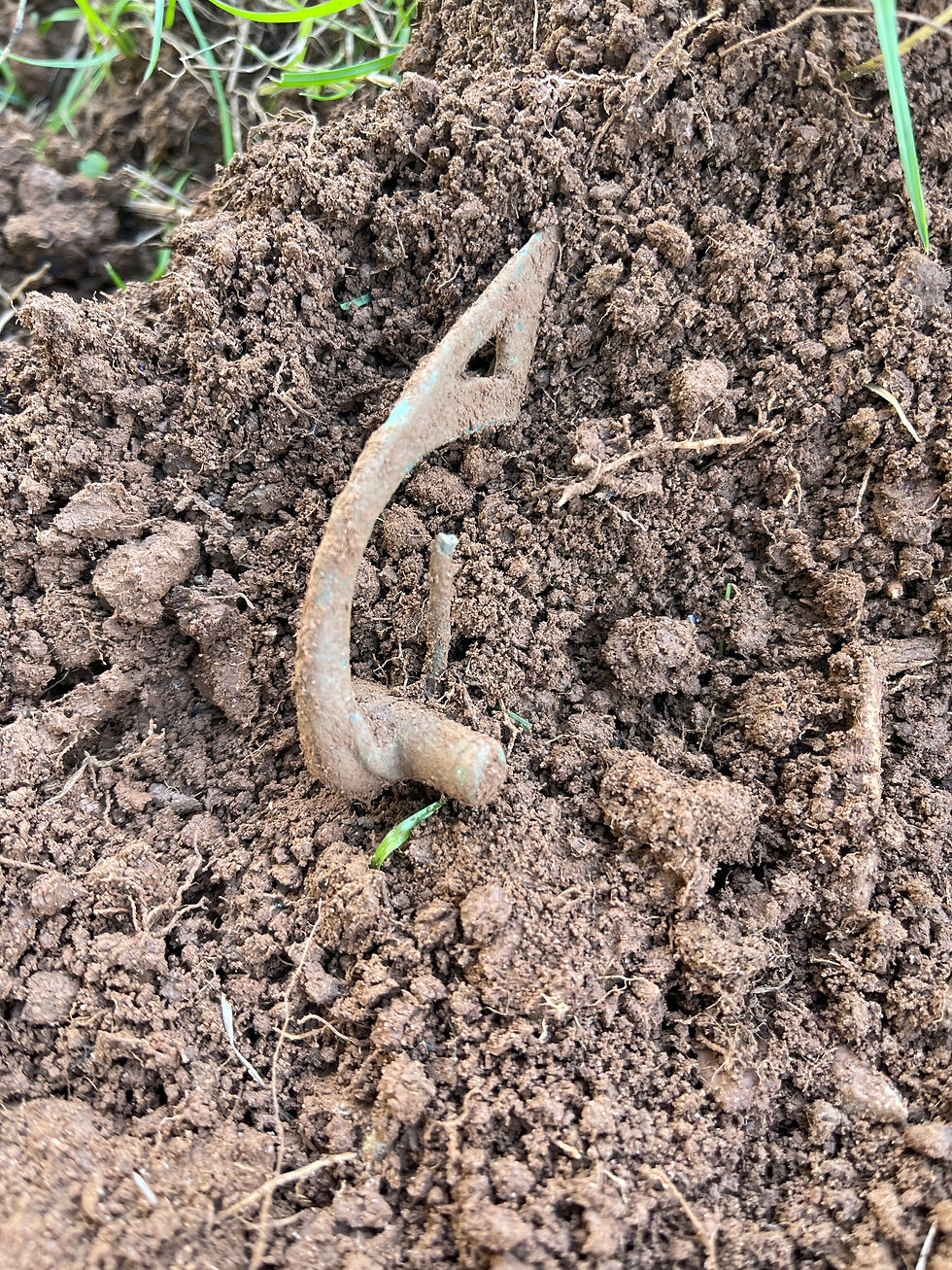
A near complete 1st-century CE fibula! I couldn't believe my eyes. I had to stop and reflect on what had just happened. AI had sent me over beneath the wind-swept row of ash, and my first target was a bucket-lister fibula. This was getting interesting, fast! I spent a few more minutes in the area, producing a musket ball and some shotgun caps. The wind was fierce that day, the trees above me were creaking, I decided to move on to safer ground.
The finds keep coming!
I walked over to the second area recommended by FieldFinders. This produced a good haul of finds. Two coins, a silver cufflink, a fibula fragment and two buckles. Considering how little this field had given up on previous visits, I was having a remarkably productive afternoon.
Edwrd 7th half penny Buckle fragment George 3rd half penny Musket ball
What interested me almost as much as the finds was the way I was detecting. I'd arrived with a plan created by FieldFinders rather than one I'd developed myself, and I was giving more attention to questionable signals because I wanted to give the ground a good going over, to give the app some quality time in the field. I'd pushed my bias to one side and allowed another one in.
We all develop habits over time. We have favourite areas, places we've written off and assumptions based on what we've found previously. I certainly had plenty of those about this field. Following the AI's suggestions took me away from my usual approach, and I suspect that was an important part of what happened.
Recording the session as I went
I'd also been using FieldFinders to record my movements throughout the session. The app tracked my route using GPS, and allowed me to log finds against their locations. I photographed my discoveries as I went and often switched between satellite imagery and LiDAR to compare what I was seeing on the ground with the landscape features on the map.
FieldFinder app FieldFinder app
I also tried the Find ID tool with the Roman fibula. You photograph your find and FieldFinders compares it against a reference collection of around 1.6 million recorded UK finds, looking for possible matches based on the object's appearance and characteristics. It's another interesting use of AI within the app, particularly when you've recovered something unfamiliar.

That's why you need to think of FieldFinders as a suite of tools rather than one. Within its ecosystem I had been able to plan and research the land before the dig, get insight into where to go when I arrived, record my dig when I was there, process finds on site, into my personal catalogue held within the app, and launch a quick find ID task the moment I found the fib.
And then it made a video of my detecting trip!
When I got home, I opened the recorded session to review the day's finds and discovered another feature I hadn't really appreciated beforehand.
FieldFinders can generate short-form videos from your detecting sessions, using the recorded route, landscape imagery, LiDAR and photographs of your finds. Perfect for sharing on social media.
So, can AI improve your metal detecting?
I went into this experiment with scepticism. I came home with a complete Roman fibula, a fibula fragment, two coins, a silver cufflink, pewter button, and buckles, all from areas I'd visited specifically because FieldFinders had directed me there.
The biggest surprise wasn't simply the finds. It was how much the app changed my approach to a field I thought I already understood, and had discounted as boring. FieldFinders gave me a clear set of places to investigate, and I found myself paying attention to signals I might previously have dismissed.
I will certainly be running more tests over the coming days, but as far as first impressions go, I can't see beyond that fibula right now. If this is the new state of metal detecting, then sign me up! And there's so much more to FieldFinders than AI scanning. It's also a marketplace for finding and booking detecting permissions, with historical maps, LiDAR, detector settings, ground conditions, finds identification and valuation, permission management and club dig tools. There's an entire suite of features here, all in one app, and we've barely scratched the surface.
If you've been wondering can AI improve your metal detecting, try FieldFinders now. You may just discover there's no looking back with an advantage like this one!


